Export User to CSV file
One click is all it takes to export your entire user database to a CSV file.
* This component is compatible with all Joomla versions.
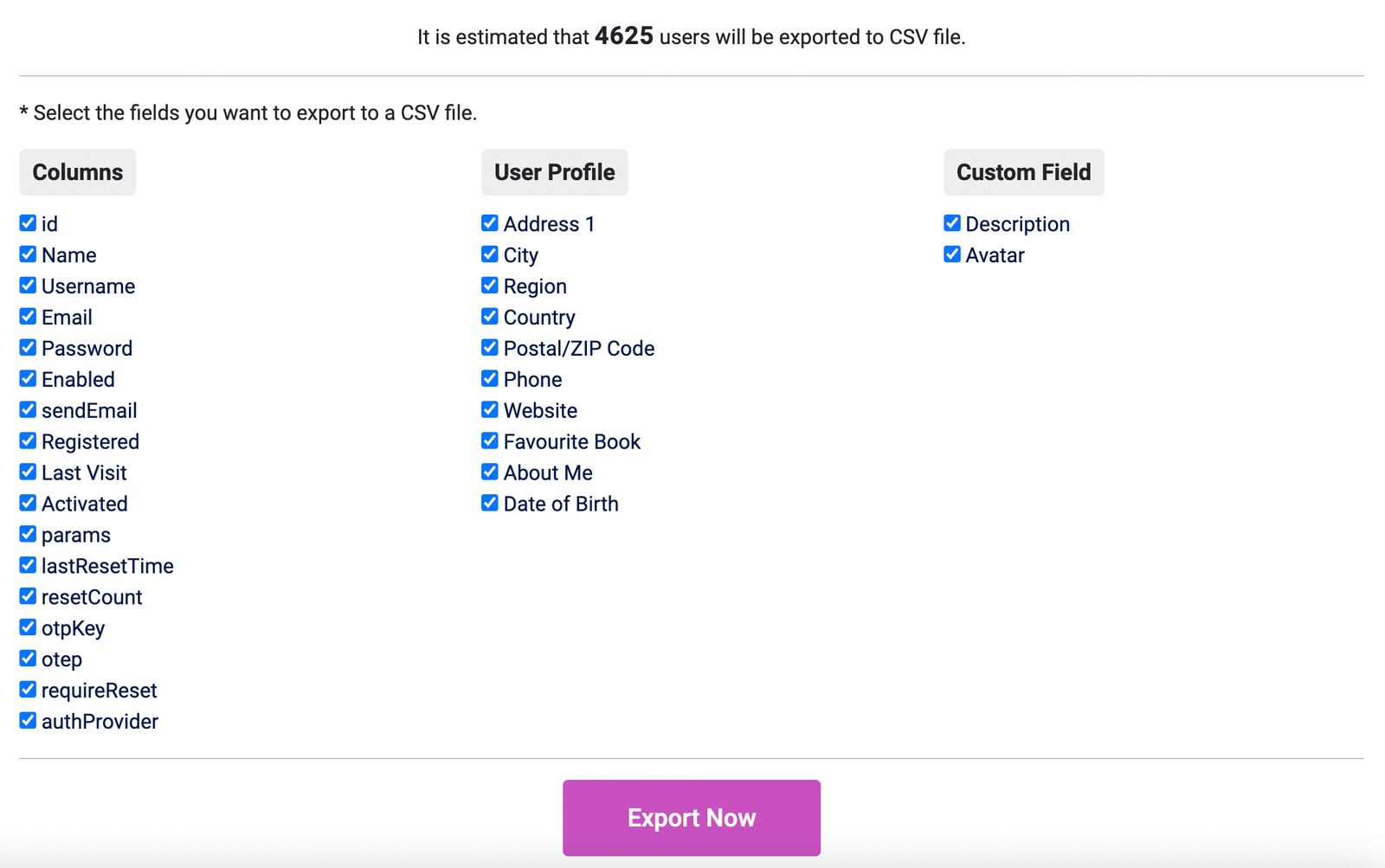
After successful installation, go to Components > JS Export User to CSV to start exporting.
Supported fields to export:
- Basic fields: username, name....etc
- Profile fields: address, birthday, website. (You enable it by going to Plugins > User - Profile)
- Custom fields: These are the fields you use with the user extension. (Users > Fields)
Here, select the fields you want to export, then click the "Export Now" button to export to a CSV file:

We are using JMP File Manager version 1.3.3 on our Joomla 6.1.1 website and need your assistance with configuring folder-level access restrictions.
Requirement:
We want users assigned to the TeamMarketing user group to access only the docs folder. They should not be able to view or access other directories, such as administrator, components, images, modules, and other folders in the Joomla root directory.
Current Configuration:
Joomla Version: 6.1.1
JMP File Manager Version: 1.3.3
Configured Path: .
Advanced Permissions:
[TeamMarketing]docs
[Editor]docs
The TeamMarketing user is assigned to the TeamMarketing group, and the TeamMarketing group is nested under the Publisher group in our Joomla user-group hierarchy.
However, after saving the configuration and logging in as the TeamMarketing user, the file manager still displays the entire Joomla root directory and its folders instead of restricting access to the docs folder.
We have also reviewed the component permissions in Joomla Global Configuration, but the folder-level restriction is still not working as expected.
Could you please clarify the following?
Is our current Advanced Permissions syntax correct for JMP File Manager version 1.3.3?
How should we configure the component to allow the TeamMarketing group to access only the docs folder?
Does the component support restricting the root directory and hiding all other folders based on Joomla user groups?
Are there any additional settings, permission rules, or code changes required to achieve this functionality?
We can provide screenshots of our current configuration and the issue for further investigation.
We would appreciate your guidance on the correct configuration or a recommended fix.
Thank you for your support.
Best regards,
^Add a message editing option for users who cannot use this feature.