- Posts: 6
- Thank you received: 0
Embed code not working
- edwardcopping
- Topic Author
- Offline
- New Member
-
Less
More
3 years 1 month ago #91
by edwardcopping
Replied by edwardcopping on topic Embed code not working
Sorry I can't find that - can you please point me in the right direction?
Please Log in or Create an account to join the conversation.
- edwardcopping
- Topic Author
- Offline
- New Member
-
Less
More
- Posts: 6
- Thank you received: 0
3 years 1 month ago #92
by edwardcopping
Replied by edwardcopping on topic Embed code not working
I should have said I am trying to use it in a Custom Module and have tried to follow your documentation on this, but am not sure I have done it correctly.
Please Log in or Create an account to join the conversation.
- administrator
- Offline
- Administrator
-
Less
More
- Posts: 98
- Thank you received: 13
3 years 1 month ago #94
by administrator
JoomHelper - Free Joomla Extensions and Tutorials.
- Facebook: bit.ly/3Fmq9AN
- Youtube: bit.ly/33onadN
- Donate: bit.ly/3uu8yFs
Replied by administrator on topic Embed code not working
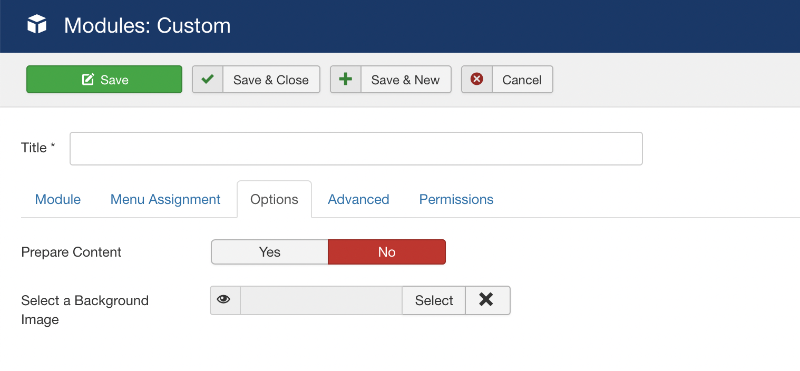
With Custom module, you need to turn on "Prepare Content" in the "Options" tab.
JoomHelper - Free Joomla Extensions and Tutorials.
- Facebook: bit.ly/3Fmq9AN
- Youtube: bit.ly/33onadN
- Donate: bit.ly/3uu8yFs
Please Log in or Create an account to join the conversation.
- edwardcopping
- Topic Author
- Offline
- New Member
-
Less
More
- Posts: 6
- Thank you received: 0
3 years 1 month ago #96
by edwardcopping
Replied by edwardcopping on topic Embed code not working
Yes I have done this but all I get is the view in this screen capture enclosed and clicking on the link doesn't open the .pptx file.
The code I have in there is:
{embedoffice IntrotoACS.pptx}
The file is located in the root folder.
The code I have in there is:
{embedoffice IntrotoACS.pptx}
The file is located in the root folder.
Please Log in or Create an account to join the conversation.
- administrator
- Offline
- Administrator
-
Less
More
- Posts: 98
- Thank you received: 13
3 years 1 month ago #97
by administrator
JoomHelper - Free Joomla Extensions and Tutorials.
- Facebook: bit.ly/3Fmq9AN
- Youtube: bit.ly/33onadN
- Donate: bit.ly/3uu8yFs
Replied by administrator on topic Embed code not working
Can you send your site access to my email: This email address is being protected from spambots. You need JavaScript enabled to view it. , I will help you asap.
JoomHelper - Free Joomla Extensions and Tutorials.
- Facebook: bit.ly/3Fmq9AN
- Youtube: bit.ly/33onadN
- Donate: bit.ly/3uu8yFs
Please Log in or Create an account to join the conversation.
Latest articles
-
Resend Activation CodeThe utility resends the activation code so the user doesn’t have to re-register with a different email.
-
Add custom Head Tag, CSS and Javascript to Joomla articleThe Joomla plugin to add custom head tag, CSS and JavaScript to your Joomla article.
-
How to Set Up Google Analytics on Joomla websiteAdd Google Analytics to track your website.
-
Delete Joomla articles in bulkWith this plugin, you can delete posts in bulk with just one click. It saves your time.
-
Insert article attributes into another articleUse this extension to insert article attributes like title, link, image...
I migrated about a thousand items with attachments from K2 using your tool and attachments plugin. I initially did this on a test account. Everything worked fine over there. The migrated article attachments worked fine. Then I backed it all up and moved it to my live domain. Now none of the attachments load. All I get is Exception File Not Found and I can't figure out where to look. Turning on error reporting and debug don't tell me anything. I am guessing the old files were not moved during the migration correct? Or how does that all work? I still have all the original folders in the original places as far as I can tell.
An error has occurred. 0 implode(): Argument #2 ($array) must be of type ?array, string given
Return to Control Panel
Any idea what's causing this?