Send Email Using SMTP in Joomla 4
By default in the Joomla configuration, the system will use the php mail() function to send emails. However, for the following reasons, you should switch to using SMTP to send mail:
- Server disables php mail() function
- Reduce server resources
- Suitable for sending large mails
- Reduce spam
This article will show you how to set up on Joomla 4 to send mail through the SMTP method.
1. Login to Joomla's admin page

2. At Dashboard, Go to System > Global Configuration > Server > Mail

3. Under Mail Settings, configure the following settings and then click Save:
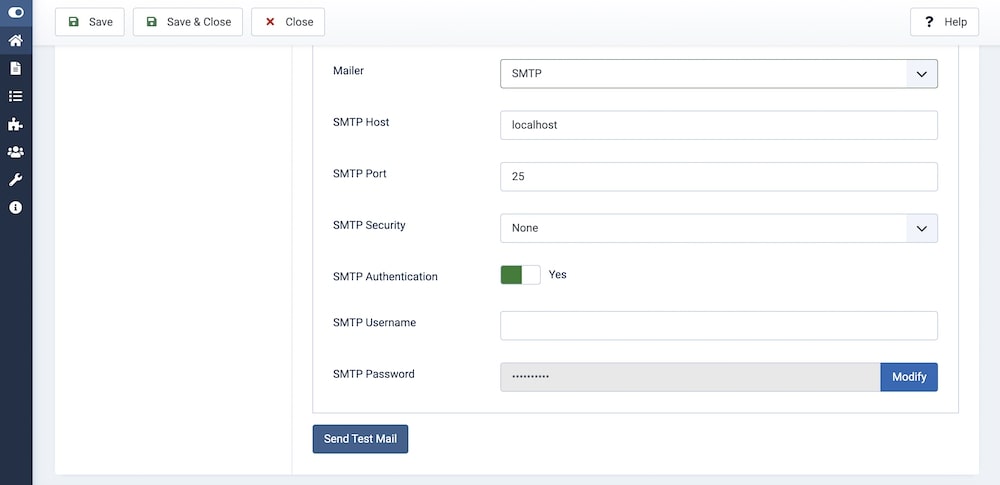
| Mailer | Set this to SMTP | ||||||||
| SMTP Host | If your email account you're sending email from is on the same server as your Joomla site, use "localhost" here. Otherwise, enter your SMTP hostname here. | ||||||||
| SMTP Port, SMTP Security |
If your SMTP server uses SSL, select this option from SMTP Security and then enter the SSL Port required for your SMTP server. Usually, the value will look like the table below:
|
||||||||
| SMTP Authentication |
Set this to Yes |
||||||||
| SMTP Username |
Enter your SMTP Username, which generally is your full email address |
||||||||
| SMTP Password |
This will usually be your email address' password |
4. Enter the remaining parameters: From Email / From Name / Reply To Email / Reply To Name.
5. Save the configuration and press the Send Test Mail button to test this functionality. If set up correctly, an email will be sent to the address you entered in the From Email field.
Some mail configurations of popular servers:
| Hostinger |
Host: smtp.hostinger.com Username: Your full e-mail address Password: Your e-mail account password Port number: 465 Encryption: SSL/TLS |
| Bluehost |
Host: localhost | yourdomain.com Username: Your full e-mail address Password: Your e-mail account password SMTP Port: 465 Encryption: SSL/TLS |
| Inmotionhosting |
Host: secure##.inmotionhosting.com Username: Your full e-mail address Password: Your e-mail account password SMTP Port: 465 Encryption: SSL/TLS |
| Hostgator |
Host: gator##.hostgator.com Username: Your full e-mail address Password: Your e-mail account password SMTP Port: 465 |
| Dreamhost |
Host: smtp.dreamhost.com Username: Your full e-mail address Password: Your e-mail account password SMTP Port (Encryption): 465 (SSL/TLS) | 587 (STARTTLS) |
Please share this article if you find it useful!

^Add a message editing option for users who cannot use this feature.