·
4 months ago
Release Article Password Plugin v1.3.1 : Fixed the issue where parameters were not loaded in a few cases.
Sometimes you have an important page that you don't want every visitor to your site to have access to. The first thing that comes to mind is to make this page accessible only to members, but then you realize that you don't want all your members to have access to this page. Just a few members. So you need an extra level of security on that page. That extra level of security means protecting the site with a "password".
This extension will help you to password protect a Joomla article.
* This extension works for Joomla 3, 4, 5 and 6.
1) Login to Joomla Admin > Go to installation page > Install downloaded package.
2) Go to the Manage Plugins section > Content - Article Password > Enable it.
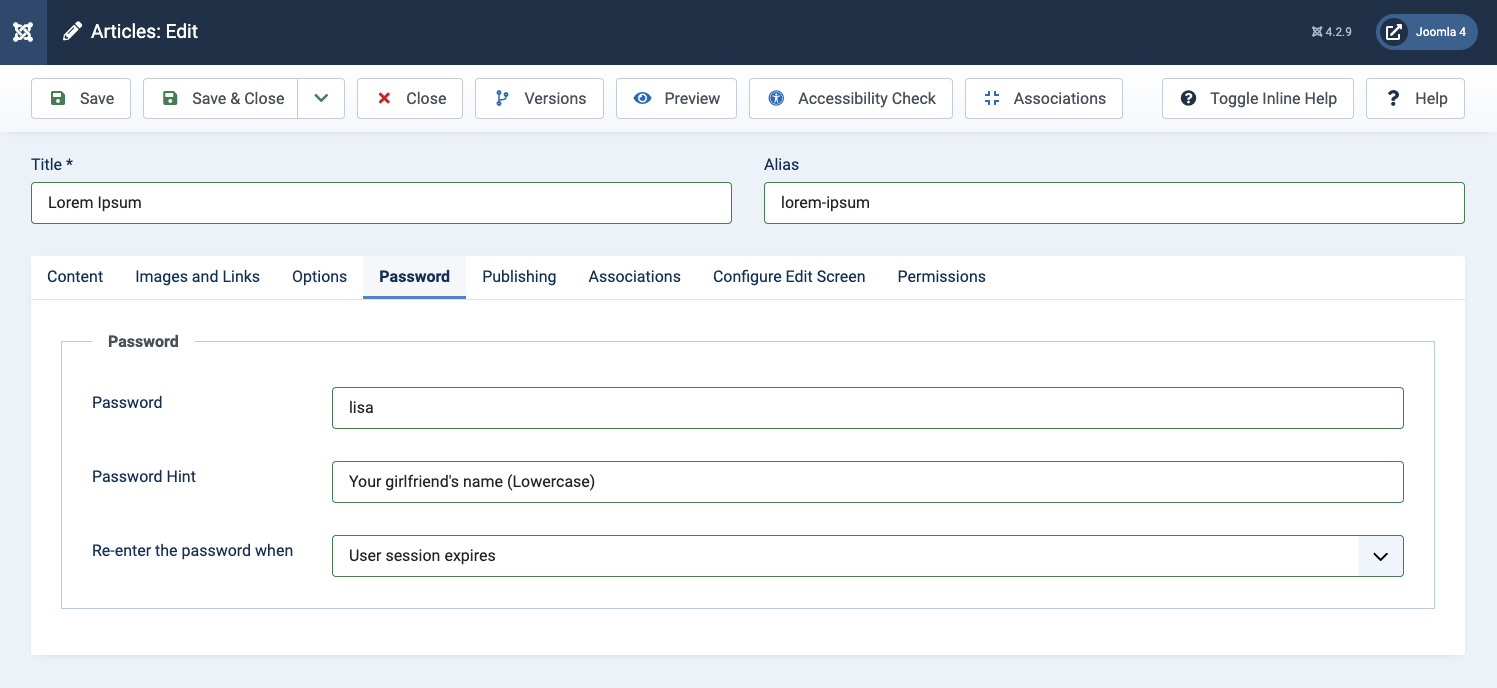
3) Go to Content Management > Select the article you want to protect > Switch to the "Password" tab to set a password. There are 3 parameters:
4) Save the post to complete the password setup process.



I'm considering purchasing your File Attachments extension for a Joomla 5 website.
I intend to use it for distributing 3D CAD model archives (ZIP files) to website visitors.
I have three questions:
1. Does the extension generate temporary download links that automatically expire after a configurable period (e.g. 5 minutes), or are the download URLs permanent?
2. Does it support rate limiting to prevent automated bots from repeatedly requesting downloads?
3. Are the uploaded files stored outside the publicly accessible web directory, and are they delivered through a PHP download controller rather than direct file access?
These features are important because I want to protect the hosting server from automated mass downloads while allowing legitimate visitors unlimited access to different models.
Thank you!
^Add a message editing option for users who cannot use this feature.